Imagine spending your entire morning wrestling with repetitive data entry or manually reformatting spreadsheets. Does the thought of automating these complex tasks feel out of reach because you aren’t a programmer? This was the reality for most professionals until recently. Recent industry data shows that 75% of new enterprise applications now utilize no-code frameworks. This shift means that the power of automation has moved from software engineers to clear communicators who know how to ask the right questions.
Claude AI drives this change by acting as a high-precision engine that interprets complex instructions with human-like nuance. Is it possible to construct functional AI Workflows Without Coding using natural language alone? The answer is a resounding yes. Utilizing Claude AI Training allows you to bridge the gap between abstract ideas and functional automation in a single day. Rather than managing endless manual tasks, this guide provides the exact framework to build intelligent, autonomous systems. These systems transform your daily output while earning you a lifetime certification to dominate the evolving professional landscape.

Jump ahead to
How AI Workflows Function Without Coding?
Historically, automation required complex programming and syntax. Claude AI changes this by using natural language as its primary input. You describe a process as if explaining it to a colleague, and Claude executes it as a repeatable sequence. This shifts the focus from writing code to defining intent. ”No-code” does not mean a loss of quality. AI still handles complex logic and edge cases while lowering the barrier to entry across various roles:
- Customer Service: Automate ticket classification and priority routing systems.
- Finance: Generate comprehensive weekly report summaries instantly from raw data.
- Human Resources: Draft tailored screening questions directly from specific job descriptions.
Consequently, the operational impact is measurable. Organizations using these workflows report a 25–35% reduction in time costs. Furthermore, by eliminating repetitive manual work, professionals can finally focus on high-value, strategic tasks. This transition from manual effort to automated precision is exactly what Claude AI Training prepares you for, providing a practical blueprint to scale your efficiency.
6-Step Framework for Building No-Code AI Workflows Using Claude AI
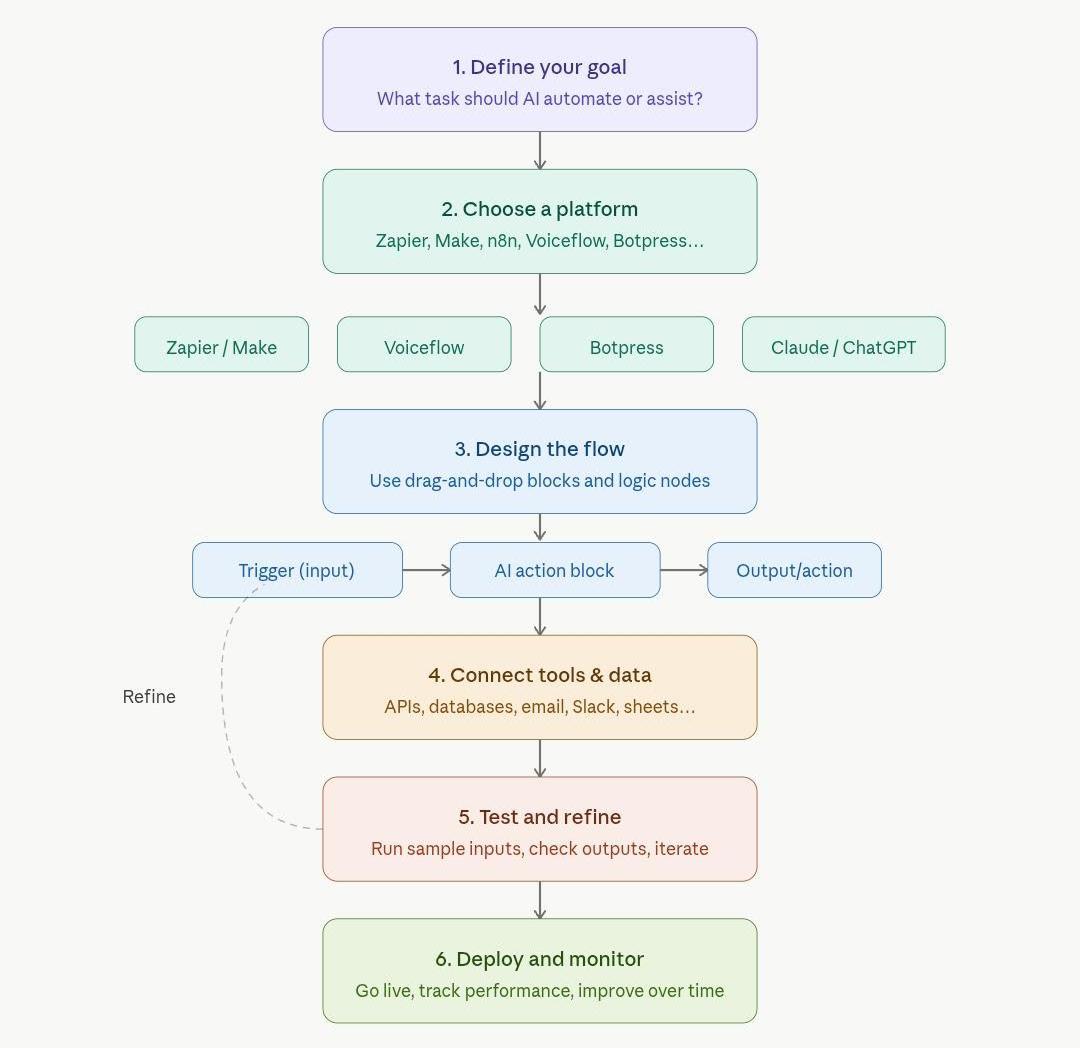
1. Define the Goal: Precision Phase
The first step requires organizations to establish their goals, as they should not pursue abstract targets such as “improving productivity,” since these goals lead to undesired outcomes. Successful workflows require organizations to identify their most difficult task which needs immediate attention.
The phase establishes its benchmark by using the Rule of Three, which states that tasks should receive automatic upgrades when they occur more than three times during a day.
- Identify the Trigger: Pinpoint the exact moment a task begins, such as an email arrival or a form submission.
- Isolate the Logic: AI needs to make a specific decision, which requires it to choose between two options (e.g., “Is this lead qualified?”). For instance, a marketing manager uses automatic software to extract essential information from a 60-minute transcript, which he uses to create social media posts and internal summaries.
2. Choose a Platform: Infrastructure Phase
The goal functions as the basis for automation when organizations select their platform, which organizes their system elements. However, the selection process requires organizations to choose between two options, which include using different software systems or creating a system for natural language communication.
| Platform | Primary Strength | Key Feature | Use Case |
| Zapier | User-friendly automation | 8,000+ App Connectors | Linking Gmail to Slack or Notion. |
| Make | Multi-branch logic | Visual Data Mapping | Advanced lead routing and webhooks. |
| Voiceflow | Conversational Agents | Contextual Memory | Building support bots or assistants. |
| Botpress | Enterprise scalability | Custom Code Blocks | High-volume customer knowledge bases. |
3. Design the Flow: Architectural Phase
Reliable workflows create their operational system through three essential components that interact with each other. Therefore, the sequence needs to be visualized before construction begins because this method helps to identify logical errors that exist in the sequence.
- Trigger: The “If” statement, for instance, a new lead submits a website form.
- AI Action: AI processes incoming information to identify both the industry sector and the financial resources available.
- Output: The “Then” statement, the system completes the loop by sending a personalized intro email and logging details into a CRM.
4. Connect Tools and Data: Integration Phase
The designers use this phase to create operational systems after they complete the logic mapping process. The process involves establishing connections between different systems and various data sources.
- Data Mapping: The system is instructed on exactly which field to read (e.g., using the “Email Body” as the primary input).
- Context Loading: Additionally, specific company PDFs or policy docs are uploaded so the AI agents act as an expert on unique business needs.
- Authentication: Consequently, all “handshakes” between apps must be authorized to prevent mid-flow disconnects.
5. Test and Refine: The Optimization Phase
Despite having a functional setup, a reliable workflow is rarely perfect on the first run. Therefore, it requires rigorous testing to handle “edge cases” gracefully.
- Stress Testing: Sample data, such as a customer complaint written in a foreign language, reveals how the AI reacts under different conditions.
- Prompt Tweaking: As a result, if the output is too wordy, instructions are refined to enforce brevity or a specific professional tone.
- Error Handling: Moreover, identifying points where data might be missing allows for the creation of “fallback” instructions to ensure the process remains uninterrupted.
6. Deploy and Monitor: Maintenance Phase
Finally, once the system is stable, it is deployed into daily operations. However, effective automation requires a proactive safety net to ensure long-term returns.
- Failure Notifications: Immediate alerts via Slack or email are established to flag any disrupted flows due to API updates.
- Quality Audits: In addition, a brief weekly review of the AI’s work prevents “quality drift” over time.
- Scaling: Ultimately, once a single workflow is stable, that same blueprint can be used to automate adjacent departments, such as moving from lead screening to automated onboarding.
The AI Ecosystem: Using Claude to Build Gemini and ChatGPT Workflows
In the current landscape of automation, a no-code AI workflow is best defined as a structured sequence where Claude AI acts as the primary logic architect to govern the real-time execution of models like Google Gemini and ChatGPT.
While Gemini and ChatGPT are undoubtedly the most recognizable “action engines” for consumer use, professional-grade builds require the superior reasoning power of Claude. By leveraging Claude’s advanced logic, developers can effectively prevent “hallucinations” and ensure the entire system remains reliable under pressure.
How Gemini and ChatGPT-Powered Workflows Rely on Claude
To achieve maximum operational efficiency, a no-code system must bridge the gap between “Knowledge” and “Action.” Consequently, these tools must integrate into a specific hierarchy:
- Knowledge Grounding: Before Gemini or ChatGPT can provide an answer, they require a structured “Brain.” To achieve this, you can use Claude to analyze raw manuals and FAQs, converting them into clean, indexed data for tools like Chatbase. This ensures that the other models stay strictly grounded in facts rather than creative guesses.
- Logical Connectivity: Linking various applications requires complex “If/Then” logic. Furthermore, Claude is used to generate the exact step-by-step blueprints and data-mapping rules for platforms like Zapier. This ensures that Gemini and ChatGPT receive data in the correct, actionable format every time.
- Intelligent Filtering: Once a customer query is captured, it is sent to ChatGPT or Gemini. However, to ensure they handle it correctly, Claude is tasked with writing the “System Prompt”, the rigorous set of rules that dictate exactly when AI should answer and when it should escalate to a human.
- Performance Auditing: Once the system is live, it logs every interaction into Google Sheets. Because Claude excels at long-context analysis, it serves as the final “Auditor” to review these logs and suggest updates to the workflow for continuous improvement.
Comparative Analysis
| Feature | Claude | ChatGPT | Google Gemini |
| Workflow Role | The Architect: Designs the logic, prompts, and data structure. | The Action Engine: Handles high-speed, diverse user | The Action Engine: Excels at pulling real-time data from Google apps. |
| Primary Strength | Superior reasoning and strict adherence to complex in | Massive library of pre-built “GPTs” and | Seamless integration with Google Workspace (Docs, Gmail, Drive). |
| Core Function | Building the “Blueprint” and auditing system logs | Executing routine customer queries and | Handling tasks that require live web search or internal file retrieval. |
Why Claude AI is the Essential Architect for No-Code Systems
While Google Gemini and ChatGPT are exceptional at real-time execution and deep ecosystem integration, they can occasionally “drift” when faced with multi-layered business logic. In contrast, Claude is the essential tool for building the framework because of its unparalleled ability to follow strict “System Instructions.”
Ultimately, you cannot build a reliable no-code workflow without Claude because it acts as the bridge between human intent and machine execution. It is the only model capable of translating a messy business process into a clean, automated sequence. By using Claude to design the foundational instructions that Gemini and ChatGPT follow, you ensure that your system is not just functional but robust, scalable, and professional.
Summary
Claude AI is the primary engine for building high-precision workflows using only natural language. It acts as a logic architect, interpreting complex business processes and turning them into automated sequences. By removing the “syntax wall,” Claude allows professionals to move from manual data entry to managing intelligent, autonomous systems. This shift helps teams reduce operational time costs by up to 35% while maintaining a high level of accuracy.
Building these workflows follows a clear path:
- Defining Intent: Use Claude to turn messy business goals into a structured “System Instruction.”
- Infrastructure: Connect Claude to platforms like Zapier or Make to move data between apps.
- Logic and Oversight: Unlike simpler models, Claude excels at multi-step reasoning and “If/Then” logic. It serves as the foundational brain that writes the rules, prevents errors, and audits the system to ensure long-term reliability.
Conclusion
Mastering the transition from manual work to automated systems starts with professional development. Claude AI Training bridges the gap between basic chat and professional system design by providing the specialized skills required to turn abstract goals into reliable, error-free automated sequences. The “syntax wall” has officially crumbled, making automation accessible through natural language.
Claude AI remains the essential foundation for these systems due to superior reasoning and strict adherence to instructions. Integrating this architectural power with the speed of Gemini and ChatGPT creates a robust and scalable ecosystem. Success in the modern era depends on the ability to define clear intent and allow AI to handle the execution.
FAQs
No, systems like Claude AI use natural language as the primary input. Professionals define processes using standard instructions rather than programming syntax.
Zapier is an accessible choice for linking tools like Gmail and Slack. It offers thousands of pre-built connectors to simplify integration.
Claude acts as the logic architect to design foundational rules. Other models serve as action engines to execute specific tasks.
Any task performed more than three times daily is an automation candidate. Identifying these patterns helps prioritize which workflows to build.
Designers upload specific documents to ground the AI in factual needs. Authentication protocols ensure data transfers remain authorized and secure.
Error handling steps create fallback instructions to manage missing data. Immediate alerts notify the team if an update disrupts the flow.
Studies indicate a reduction in operational time costs of up to 35%. This allows teams to focus on strategic objectives.
Claude analyzes raw data and converts it into clean, indexed information. This creates a factual brain that prevents creative guesses.
The model reviews interaction logs to identify errors or inefficiencies. It then suggests updates to ensure long-term improvement.
Claude establishes the rules that dictate how other AIs respond. These instructions define when to automate or escalate to humans.